Feature spotlight

Aug 6, 2026 • 2 min read

In This Blog
Roll a program up across regions and you inherit their calendars too.
A US stakeholder calls it “Week 33.” Your Rotterdam team, working Monday-start ISO weeks, calls the same seven days “Week 32.” So, someone was always translating, or worse, showing up to a status meeting quoting the wrong week.
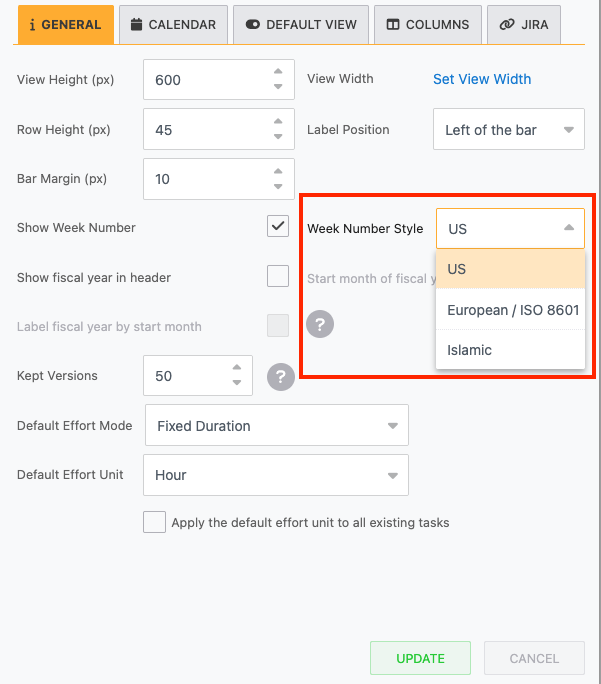
Gantt Chart Planner now lets you configure both the week start day (Sunday, Monday, or Saturday) and the numbering standard (US, European/ISO 8601, or Islamic) from the same configuration panel where you already set working calendars.
Week numbers on the timeline header recalculate automatically to match whichever standard you pick; there’s no separate plugin or manual override per task.
Picture a PMO lead running a program with delivery teams in the US, Germany, and the UAE. Finance reports in ISO week numbers because that’s the standard the rest of the business already uses.
Before, her Gantt chart quietly disagreed with every other report crossing her desk, so she kept a manual cheat sheet to convert between the two. Now she opens the configuration panel once, sets the standard to European/ISO 8601, and the chart matches finance’s “Week 32” language from that point forward.
No more asterisks on the slide explaining which calendar she means.
It’s a small setting with an outsized effect on trust: when the week number on your Gantt chart matches the week number in every other report a stakeholder already reads, nobody has to take your word for where the project stands; the numbers just agree.
Full configuration steps, including how each standard determines its Week 1, are in the docs: Show week number.
Not using Gantt Chart Planner for Confluence yet? Start a 30-day free trial to see how it works for your team.