Feature spotlight

Aug 9, 2026 • 1 min read
In This Blog
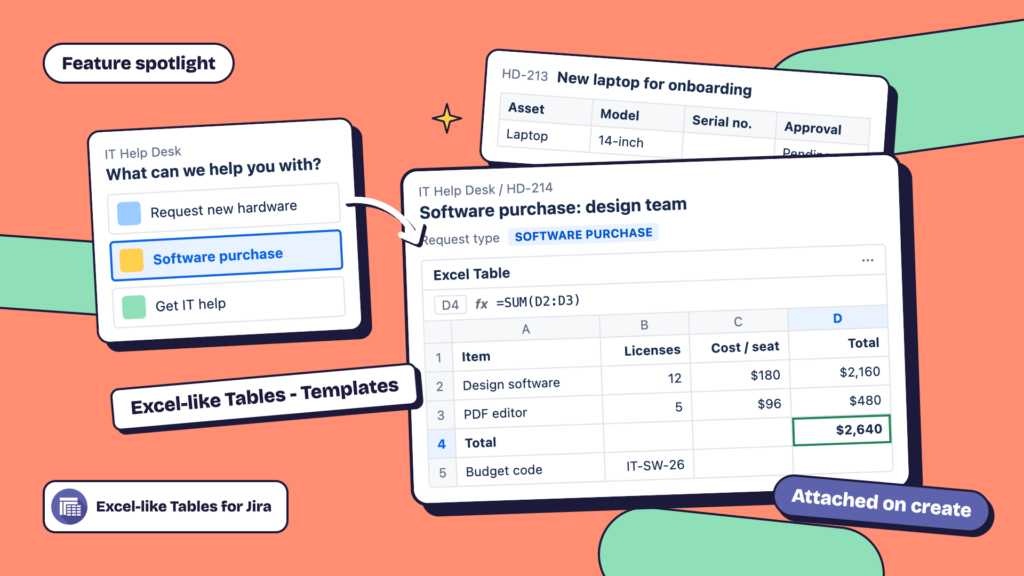
Template tables can now be scoped to the specific JSM request type a customer selects, not just the underlying issue type. That means the table a requester’s ticket gets attached to can match what that particular request actually needs to capture.
Picture a service desk supporting both hardware requests and software purchase requests from the same project. The hardware request type gets a table for asset details and approval sign-off; the software purchase type gets a different table for cost, license count, and budget code. Both show up automatically based on which request type the customer picked when they submitted; the agent isn’t manually attaching or rebuilding a table for each ticket.
Templates are configured from your project’s Excel-like Tables settings. See Auto-populate Jira Issue with a Table for the general setup flow, and the 2.1.0 release notes for what shipped with this update.
Not using Excel-like Tables for Jira yet? Start a free 30-day trial to see how request-type templates work in your service desk.