








News
In This Blog
One of the most requested features that we receive is Gantt Permission Control, and there are good reasons that we prioritized this issue.
If you manage an enterprise-scale Jira deployment, you are also responsible for the security and confidentiality of every project. Uncontrolled and unauthorized user access can cause serious breaches or unwanted modifications to your Jira instances. Permission control is the first step to mitigate potential risks from data trespassing.
Meanwhile, not all teams require a Gantt chart add-on. It only makes sense to configure the use of the WBS Gantt-Chart feature for specific Jira user groups.
You can now control Gantt permission within the app. We’re also announcing:
- Improvements in issue templates
- Resolved bugs in various feature displays
- Ending support for Jira 7.5.x and below
Read our updates in more detailed below.
What’s new in WBS Gantt-Chart for Jira 9.11?
Note: WBS Gantt-Chart for Jira 9.11 is compatible with Jira Server 7.6.0 – 8.4.2
New Feature: Gantt Permissions
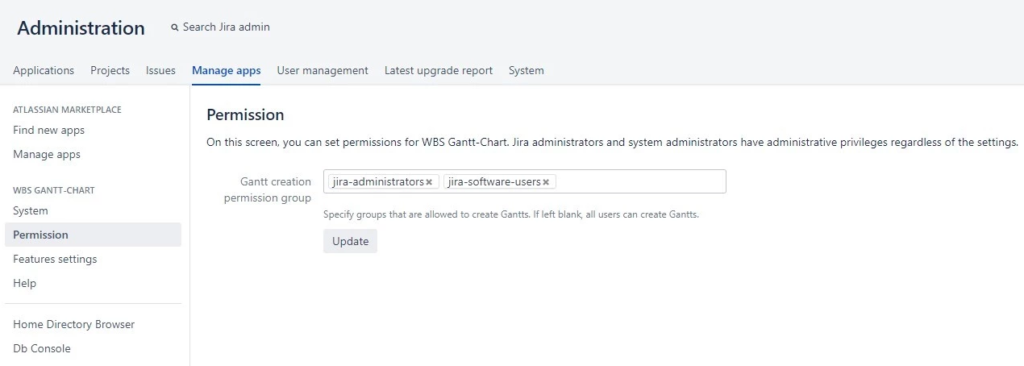
From the Administration panel, click on Manage Apps to open up the Permission control feature for WBS Gantt-Chart. Here, you can authorize access by user group to limit the creation of Gantt charts.
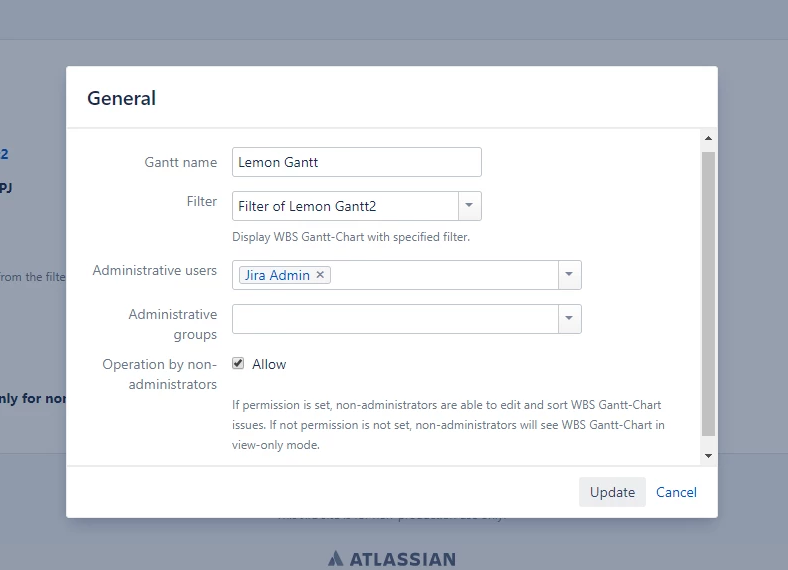
You can also control editing operations by enabling or disabling non-administrators permission in the Gantt project setting. If you disallow operation by non-administrators, users will access the Gantt chart in View Only mode.
Improvements
Here are the feature enhancements from the previous releases:
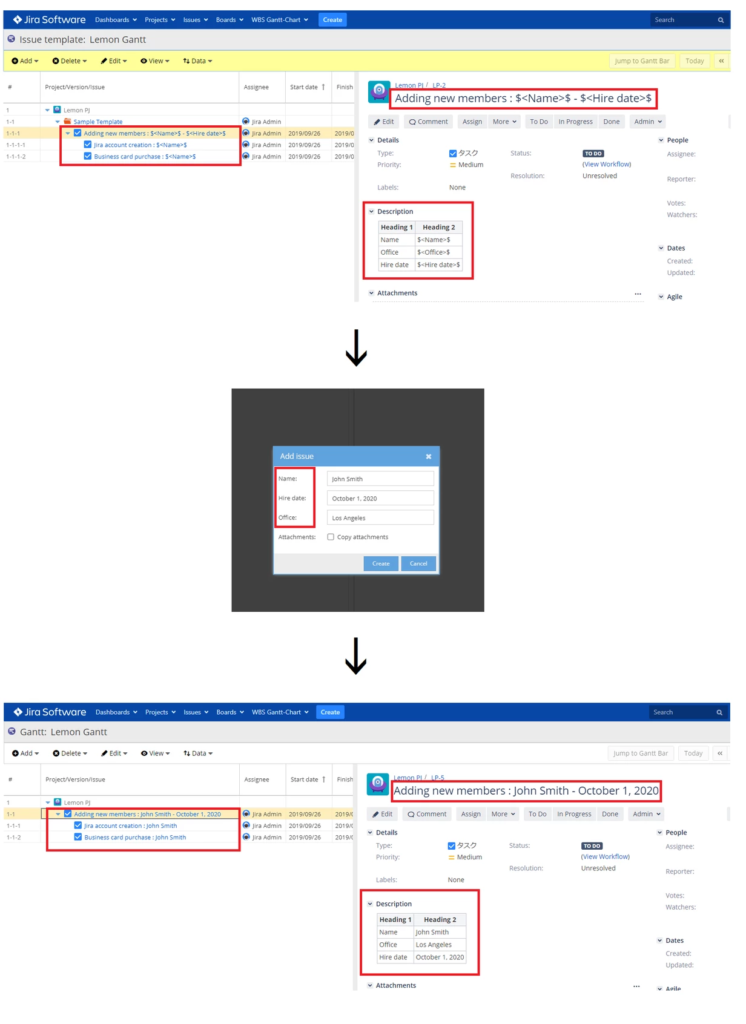
- Multiple text replacement in the issue template: When creating issue templates, you can add multiple placeholders in predefined fields using the “$<arbitrary text>$” markup, which wasn’t possible in the previous version. Note that “$” replacement existed from the older version will be depreciated.

- Replication of custom fields and attachments from the issue template
- Whenever you create a new issue from template, all preset values from fields and attachments can be copied and added to the issue automatically.
Bug fixes
We’ve also resolved the major bugs:
- Broken hierarchical display with issue template: fixed the display of hierarchy structure when creating issues from issue template.
- Missing critical paths in between the schedule gap: now showing critical paths for all issues with a dependency relationship.
- Resolved resource tooltip incorrect content display: now, when you hover over the resource view, the content will show correctly regardless of the range of Gantt chart.
- Display issue with user picker column in large environments (>1000 active users): user picker column now shows complete potential assignees.
With this release, we also end our support for Jira versions older than 7.5.x. So update now to enjoy a more functional and stable WBS Gantt-Chart for Jira.
Stay Updated on Our Product Roadmap
Stay ahead of future releases or raise your request to us via the public tracker. Our goal is to power up your productivity with more advanced features of WBS Gantt-Chart for Jira, so you and your team can focus on delivering great work, one Gantt at a time.
Your feedback helps us make the app better. Join the discussion here.
Download a free 30-day trial of WBS Gantt-Chart for Jira now to experience the power of Gantt charts.